Your first frame is a thumbnail
A product video spends most of its life as a single still. It sits paused in a gallery, in a grid, in a search result, and only becomes a video for the fraction of people who choose to play it. So the opening frame is doing the work of a photograph, and it should be judged like one — for legibility of the product, not for atmosphere.
Published · updated — written and checked by hand.
This is the part of product video that is easy to get wrong, because it is invisible while you are making the thing. You watch a ten-second film on a loop, you judge the move and the light and the grade, and you approve it. Then you publish it, and what almost everybody actually sees is one frame of it, at the size of a thumbnail, with no motion at all.
Most of your audience will only ever see one frame
Every surface that carries product video has an idle state, and the idle state is a still. A product gallery shows a cover until a shopper interacts with it. A feed autoplays muted while somebody is already scrolling past. A search result shows a thumbnail beside a link. None of those is the film; all of them are the film's first impression, and each one is competing against still photographs that were composed to be looked at exactly this way.
Which surface picks which frame, and whether you can override it, differs by platform and changes without notice — go and look at your own, in the admin you actually publish from, rather than trusting a blog post about it. What does not change is the shape of the problem: something stands in for the video, and the more of that choice you make deliberately, the less of it is made for you.
The frame has to answer three questions
Not artistic questions. The three a shopper resolves in about a second, before deciding whether this listing is worth any more of their attention:
- What is this? The product should be identifiable as a category — a watch, a bracelet, a bag of popcorn — without reading the title.
- How big is it? Scale is the thing stills lose most often. A hand, a wrist, a table edge, a familiar object in frame: any of them settles it instantly.
- Is it the thing I was just looking at? If the frame does not obviously match the listing photo above it, it reads as a different product, and a shopper resolves that confusion by leaving.
A frame that is beautiful and fails any of those three is worse than a plain one that passes all of them. This is the trade the word 'cinematic' quietly hides: the most cinematic moment in a film is usually the one with the least product information in it — the flare, the rack focus mid-travel, the shot where the subject is half out of frame on its way somewhere. Wonderful at second four. A poor advertisement for the product at second zero.
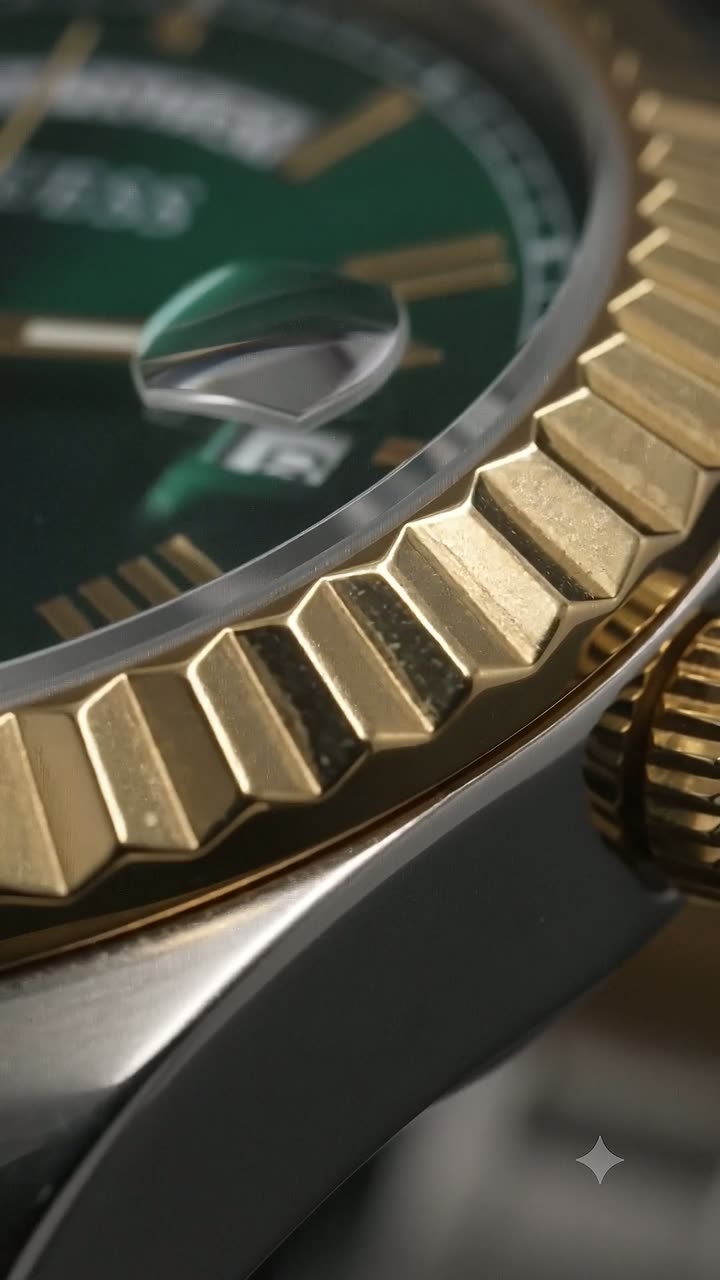
The film above is a fair example of the tension. It moves across a fluted bezel, a green dial and a cyclops lens, and the interesting frames are the ones mid-move. The frame you would want standing in for it is the one where the whole watch is legible and square to the viewer — which is not the most beautiful second of the ten.
The crop happens after you upload
The second thing that happens to your first frame is that somebody else crops it. A vertical 9:16 film placed in a square gallery slot loses the top and bottom; a widescreen 16:9 film in a vertical feed loses the sides. This is ordinary and unavoidable — it is what happens to every image on the internet — but it is worth designing around rather than discovering afterwards.
The practical version: keep the product away from the extreme edges of the opening frame, and keep the part of it that identifies it — the dial, the clasp, the label — nearer the centre than feels natural. Composition that survives a centre crop survives everywhere. Nitaris delivers both a vertical 9:16 master and a widescreen 16:9 one, which means you are usually choosing which file goes where rather than accepting one crop everywhere, and that choice is worth spending thirty seconds on.
What to check before you keep a render
Concretely, when a render comes back and you are deciding whether to keep it or regenerate:
- Pause it on the very first frame and look at that alone, small. If it does not read as your product at thumbnail size, the rest of the film does not matter yet.
- Check the product is not cut by the frame edge at the start, even if the move brings it fully in later.
- Check it still matches your listing photo — same colour, same finish, same object. The opening frame is where a mismatch is most visible and most costly.
- Only then judge the move, the light and the grade. Those are what a second viewing is for.
If the first frame fails, regenerating is the right response, and changing the mood is the highest-leverage way to do it: the treatment drives the camera move, and the camera move is what decides where the film starts.
Where this leaves the file you publish
Nitaris hands over a clean MP4, carrying whatever sound you chose for it. What it does not hand over is a decision about which frame represents it — that belongs to the surface you upload to, and to you. The one lever you hold with certainty is which render you keep. Judging that render as a photograph first, and a film second, is the cheapest quality improvement available on a product listing, and it costs nothing but the order you look at things in.
Read enough? Watch your own product.
One photo in — a cinematic 10-second video and a full set of marketing photos out. Your first one is free.